Apps
FaceApp: Revolutionize Your Photos with Realistic and Creative Effects
Discover how to realistically transform your face using FaceApp. Filters for hair, makeup, age, and more are just a tap away.
Advertisement
The favorite app for transforming selfies
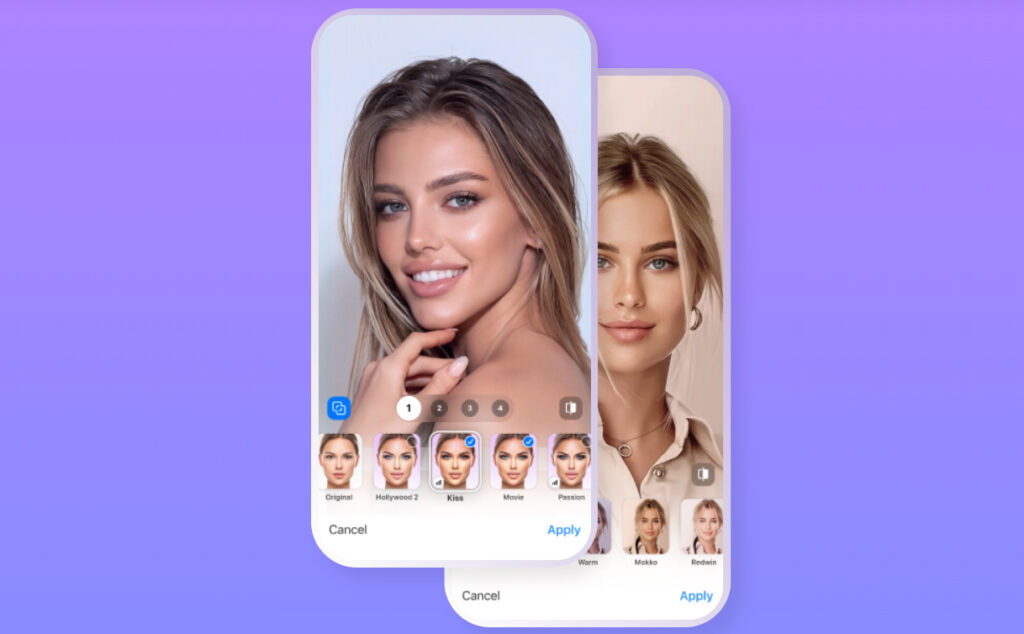
Have you ever imagined seeing yourself with a different hairstyle, beard, or even a few years older or younger?
FaceApp makes this possible with just a few taps on the screen, using state-of-the-art artificial intelligence.
With over 1 billion downloads, the app is a benchmark when it comes to realistic face editing.
In this article, you'll discover everything FaceApp has to offer, how it works, and why it's become so popular worldwide.
What is FaceApp?
FaceApp is a photo editing app that specializes in transforming faces with a high level of realism.
Launched in 2017, it quickly gained prominence for offering impressive edits with just one tap.
Unlike generic filter apps, FaceApp applies changes that respect the proportions of the face and simulate light, texture, and even aging in a natural way.
It's available for Android and iOS and can be used for both serious editing and playing with friends.
Main features of FaceApp
With a powerful combination of artificial intelligence and intuitive tools, the app offers features to completely transform your face, hair, and style.
Check out the features that make it one of the most popular selfie editors in the world.
Face editing with stunning realism
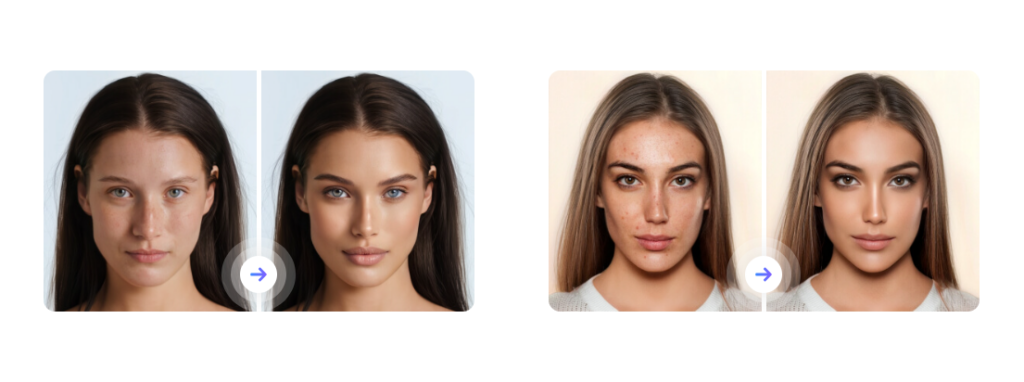
FaceApp offers a range of advanced tools to enhance or transform your face without requiring any image editing knowledge.
You can:
- Add a beard or mustache, with a variety of style options
- Change your hairstyle and hair color, choosing from various shades and cuts
- Apply virtual makeup, with professional-level results
- Soften the skin, removing spots and pimples naturally
- Correct wrinkles, expression lines and other facial details
- Adjust proportions, such as mouth, nose, chin and cheeks
All of this is done with artificial intelligence, which understands the contours of your face and applies changes realistically, without the artificial effect typical of amateur apps.
Makeup and style filters
If you like to test out looks before using them on a daily basis, FaceApp lets you try out different makeup styles in seconds.
- Lipstick, eyeshadow, blush and highlighter with a natural effect
- Realistic colored contact lenses
- Filters that enhance features without exaggeration
- Simulation of light or more striking makeup
These resources are ideal for both those who want to have fun and those looking to plan an outfit for a special occasion.
Printing filters and light effects
With filters called “Impression,” your selfies get a magazine cover feel.
These filters apply professional adjustments to light, shadow, contrast, and sharpness. The result is photos with a sleek, refined look, perfect for Instagram or LinkedIn.
Additionally, FaceApp also offers creative lighting effects that simulate studio lighting and create different atmospheres for each photo.
Fun and creative effects
In addition to its beauty tools, FaceApp is also known for its viral effects that play with people's appearance.
Among the public's favorites are:
- Aging filter (how you would look older or younger)
- Gender swap with realistic results
- Weight simulation (thinner or fuller look)
- Combine styles from different photos in a single portrait
These features have made the app a hit on social media platforms like TikTok and Instagram, with thousands of videos showing hilarious or surprising transformations.
Hair editing: style and color with realism
Among the most popular features of FaceApp is changing hair, both in terms of cut and color.
With the hair editing function, the app allows you to:
- Try new styles, such as short, medium and long cuts
- Add volume to your strands, leaving hair fuller
- Try different colors, from classic tones to the most daring
- Let AI suggest the best style for your face shape
The hair simulation is one of the most realistic among apps of its kind, which makes FaceApp an excellent tool for those who want to change their look without regret.
How to use FaceApp
Using FaceApp is extremely simple, even for those who have never edited a selfie in their life.
See the step by step:
- Download FaceApp on your phone, available for Android and iOS at no cost
- Launch the app and choose an image from your gallery or capture a new selfie on the spot.
- Choose the filter or tool you want: hair, makeup, beard, age, etc.
- Adjust the details with the sliders
- Compare before and after with just one tap
- You can save the result to your gallery or post it directly to Instagram, TikTok, and other networks.
Free vs Premium version
FaceApp offers a free version that is quite functional, but with limited access to some features.
In the premium version, the user unlocks:
- Exclusive filters
- Advanced makeup effects
- More hairstyles and beard styles
- Ad-free edition
- Export high-resolution photos
Subscriptions can be monthly, annual, or lifetime, and are usually good value for money for those who use the app frequently.
Why has FaceApp become so popular?
FaceApp's success lies in the combination of three factors:
- Ease of use: complex edits are done with one click
- Realism of editions: the effects respect the real proportions and textures
- Fun and creativity: in addition to beauty, the app delivers entertainment
With these features, FaceApp appeals to both those looking to improve their photos and those looking to have fun with friends.
Want more? Explore other popular apps
If you liked FaceApp and enjoy using technology to present yourself in the best light, you might also be interested in an app that goes beyond editing: Tinder.
After all, after taking a great selfie, how about using it to meet new people?
Tinder is the world's most popular dating app and could be the next step to confidently enjoying your photos.
Check out our full article on Tinder and see how to make the most of your matches with an impactful profile.

Tinder
Tinder has revolutionized online dating. Learn how it works, tips for more matches, and precautions for safe use!
Trending Topics

Call of Duty: Play for free and dominate the battlefield
Call of Duty offers intense action with realistic graphics and varied modes, including multiplayer and battle royale. Get ready to win!
Keep Reading
How to choose between playing on PC, console or mobile without error
Choosing between playing on PC, console, or mobile involves considering your needs, budget, and lifestyle. Balance enjoyment, convenience, and cost!
Keep Reading
How to prevent apps from consuming too much battery on your phone
Prevent apps from consuming too much battery by adjusting brightness settings, notifications, and background restrictions.
Keep ReadingYou may also like

iCarros vehicle financing: credit approved even with a bad credit history
Discover how to finance your vehicle with iCarros, even if you have a credit restriction. Fast, digital proposals backed by Itaú.
Keep Reading
Apps to Recover Deleted Photos: 4 Best Options!
Restore deleted images from your phone using powerful apps. Learn how to restore lost files easily and safely!
Keep Reading
YouCam Makeup: Try New Hairstyles in Seconds
Try realistic cuts and colors! YouCam Makeup is the ideal app for AI-powered hairstyles. Learn more here!
Keep Reading


